
A pre-production checklist is the list of decisions, approvals and bookings that must be closed before a camera rolls. Done well, shoot day is execution only: nobody is hunting for a release form, a parking permit or the person who can approve a change. Below is the checklist we would hand to a nonprofit development director, a corporate marketing team or an event organizer, in the order the work actually happens, with the points where shoots most often go wrong.
If you would rather have a producer run this list with you, our video production team plans and shoots projects for nonprofits, corporate teams and event organizers.
TL;DR
- Lock the goal, audience, message and deliverables in writing before you touch a script, schedule or budget.
- Budget and schedule are one decision, not two: change one and you change the other.
- Paperwork comes before the shoot: releases, location permissions, permits and insurance certificates in one shared folder.
- Plan contingencies with an owner and a decision time, especially weather, a missing speaker and failed audio.
- Finish with one final meeting that ends in a recorded go, conditional go or no-go.
Table of Contents
- Who needs this checklist, and when to use it
- Step 1: Define the goal, audience and message
- Step 2: Lock the script or the event run of show
- Step 3: Build the budget and schedule together
- Step 4: Cast, crew and talent
- Step 5: Scout locations and logistics
- Step 6: Paperwork, releases and permissions
- Step 7: Technical checks
- Step 8: Plan audience Q&A capture
- Step 9: Contingencies, with owners
- Step 10: Hold the final production meeting
- Our perspective
- Let us run the checklist with you
- FAQ
- Sources
Who needs this checklist, and when to use it
This list is built for people who commission or organize media rather than operate cameras: a nonprofit producing a fundraising film or gala recap, a corporate team making a promotional video, an event organizer booking coverage of a summit or conference, a small business building its first video library. If you work with a production partner, the checklist tells you what you are responsible for supplying and approving. If you produce in-house, it tells you what to close.
Use it three times:
- At kickoff, to see the whole job and assign owners.
- Midway through planning, to find what is still open while there is time to fix it.
- At the final production meeting, before the call sheet (the one-page schedule listing who is where, and when, on shoot day) is treated as final.
For a typical project, our video production timeline shows how these steps spread across six weeks or compress into two.
Step 1: Define the goal, audience and message
Everything downstream depends on this step. A video that exists to "raise awareness" cannot be scripted, budgeted or judged. A video that exists to move first-time visitors to a donation page, or to get event attendees to register for next year, can.
Write four lines before anything else:
- Business or mission goal. One outcome, such as gala pledges, qualified leads or registrations.
- Audience. Who watches, where they watch it, and what they should do next.
- Message. The one thing a viewer should remember, in a sentence.
- Deliverables. Every file you need: the main film, a 30-second cut, a vertical version for social, captions, a still frame for the thumbnail.
The last line matters more than people expect. Versions have to be planned at capture. If you need a vertical cut for social, the shoot has to frame for it, and a request that arrives after the shoot usually means compromised footage or a second day.
Put this in a brief and get it approved by the person who will sign off on the final cut. Our video brief template is a fill-in version, and the preproduction questionnaire lists 40 questions a producer asks to pull the same information out of a team. If video is part of a wider plan, one outcome, one platform is how we suggest narrowing the strategy, and the B2B video strategy guide covers it for corporate teams.
Where it goes wrong: the brief is "approved" because nobody objected. Silence is not sign-off. Name one approver and get the approval in an email.
Step 2: Lock the script or the event run of show
For a scripted or interview-driven video, the script or interview plan is the foundation. As one production-planning guide puts it, without a complete script you cannot cast, design the look, determine crew and equipment, list locations, budget or schedule. Be careful to treat "complete" as a decision, not a feeling: after a set date, changes go through the approver and are priced.
For an event, the equivalent is the run of show: a minute-by-minute document of what happens on stage and in the room. It should name every session, speaker, cue, transition and break, because coverage is planned from it. A crew cannot be in the right place for the keynote handoff if the handoff is not on paper.
Check that:
- The script, interview questions or run of show is at the stage you agreed, with a version number and date.
- The storyboard or shot list reflects it. For photography at events, a shot list you can hand over keeps the must-have moments (the sponsor handshake, the check presentation, the keynote close) from depending on someone's memory.
- Interview subjects have received their topics or questions, and know the time and place.
Where it goes wrong: planners write the ideal script, then discover a location, a person or a budget line that does not exist. Planning is a loop of adjusting the script to what you can actually get. Doing that adjustment now, as the same guide explains, means you shoot the plan rather than improvise a fix on location.
Step 3: Build the budget and schedule together
Budget and schedule are two halves of one circle. A longer shoot day costs more crew time. A tighter budget forces fewer locations or fewer setups. Treat them as a single plan.
The World Intellectual Property Organization's planning checklist for audiovisual projects is a useful backbone even for small productions. It calls for setting key milestones, producing a final budget and adjusting the plan to it, agreeing a production schedule with the team, and defining crew roles with written engagements, including clauses on who owns the work.
In practice:
| Item | What to settle | Typical trap |
|---|---|---|
| Milestones | Script lock, shoot date, rough cut, final approval | Review rounds not on the calendar |
| Budget | Crew, equipment, locations, talent, music, permits, a contingency line | Contingency left out |
| Schedule | Prep, shoot, edit, review, delivery | Approvers unavailable during review |
| Crew roles | Who covers camera, sound, lighting, direction | Two people assume the other has audio |
| Ownership | Who owns the footage and the final film | Left unstated until a dispute |
Ask any production partner for a quote that lists what is and is not included, including how many review rounds. Our RFP guide for video production shows what to include in a request and how to compare bids on scope, not just price.
Step 4: Cast, crew and talent
Confirm every role and every call time, and make the confirmations written. For nonprofits, the people on camera are often beneficiaries, donors or board members, and for them the logistics are as important as the script: where to park, how long it takes, who greets them, whether a child's guardian is present.
For each on-camera person, record:
- Name, role and how to pronounce the name.
- Contact details and a backup contact.
- Arrival time and expected duration.
- Wardrobe or location notes.
- A signed release, covered in step 6.
For critical participants, such as a keynote speaker or a major donor, name a backup. If the person falls through, the plan should still produce a usable film.
Step 5: Scout locations and logistics
A location that looks right in photographs can fail on the day for reasons that never show up there: noise, power, light that moves, no loading route. Visit in person, at the same time of day as the shoot, and check the practical details: power outlets, ambient noise, natural light, where the crew parks and loads gear, restrooms, and how the venue contact will be reached on the day. Our location scouting checklist walks through seven checks producers use to budget a location.
For event venues, also confirm:
- Load-in and freight routes, elevator access and timing.
- Rules on tripods, lighting and drone use.
- The venue's own requirements, such as certificates of insurance.
- Who at the venue can open doors, adjust lights or approve a change.
Where it goes wrong: assumptions are treated as approval. "The venue said it should be fine" is not a permit. Get the answer in writing.
Step 6: Paperwork, releases and permissions
Gather documents in one shared folder before the shoot, not after. The core set:
- Talent and appearance releases for everyone identifiable on camera. Anyone whose face or voice appears in a fundraising film needs to have agreed in writing to the use.
- Location releases and permits where required, with copies on set.
- Certificates of insurance that the venue or client has accepted.
- Music and asset licenses for anything not original.
- Reference files: logos, brand guidelines, product details and verified facts or figures that will appear on screen.
If union performers are involved, reuse of their performance usually has its own rules. For example, a SAG-AFTRA sample agreement for ultra-low-budget projects requires consent for reuse of a performer's photography or soundtrack to be in writing and separate from the performer's contract. If your project involves union talent, confirm the terms with the union or an entertainment attorney.
For releases with specific legal wording, minors or sensitive stories, have an attorney review your template once and reuse it.
Step 7: Technical checks
Technical planning is where a producer earns the fee. Confirm:
- Camera and lens plan matched to the deliverables from step 1.
- Power, lighting and sound plan for each location, including what the venue provides.
- Backup media and batteries, with a clear data-handling plan for offloading and duplicating files the same day.
- Audio redundancy. Sound is the failure viewers forgive least. Our guide to backup audio recording shows how to protect events and interviews.
- Internet and encoding for livestreams, with a tested connection and a second path if the first fails.
For live events, livestream production adds its own checks: a stream destination, a delay or fallback plan, and a clear owner for the on-air feed.
Step 8: Plan audience Q&A capture
Q&A is often the most valuable part of a summit or town hall and the part most often captured badly. Decide in advance what the recording is for: a full-session archive, a highlight reel or a livestream with live questions. Then plan around that.
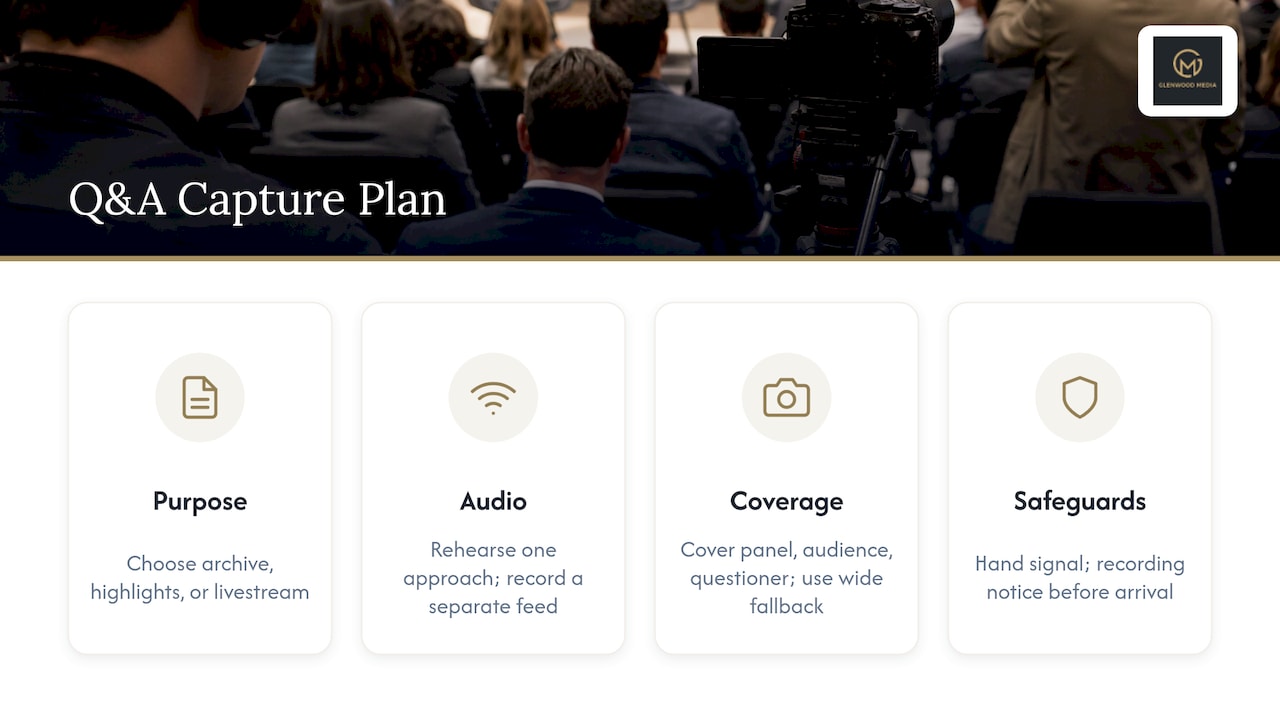
Microphones. Audience speakers are the weak point. Choose one approach and rehearse it: handheld wireless microphones passed by runners, a fixed microphone at an aisle stand, or a questioner-to-stage routine where the moderator repeats each question. A repeated question is the simplest fix because the room microphones will not reliably pick up a voice in row 12. Assign a person to each microphone and test every unit with the room full of speakers' voices, not an empty hall.
Camera coverage. Decide which camera is on the panel, which is on the audience, and who covers the questioner. A wide shot of the room can serve as the fallback when no one can reach the person speaking. If you livestream, tell the director how fast to cut to the questioner.
Moderator cues. Brief the moderator on how to invite questions, wait for the microphone to arrive, restate the question and keep answers on time. A simple hand signal between moderator and floor director avoids dead air.
Consent. Tell attendees before they arrive, in the registration confirmation and on signage, that the session is recorded and may be published. Recording and consent rules vary by state and by the kind of use, so have your attorney confirm the wording for your event, especially if the footage will be used in fundraising or advertising. Ask anyone who speaks on a microphone to accept the notice, and have a plan for people who prefer not to appear, such as a seating section outside camera view or a question submitted in writing.
Backup. Record the Q&A microphone feed on a separate audio device so a wireless dropout does not erase a donor's question.
If you organize a corporate summit, our media event coverage service covers sessions, speakers and recap content.
Step 9: Contingencies, with owners
A contingency plan is only a plan when it names who decides and by when. For each risk, write the trigger, the owner and the deadline. The common ones:
- Weather for outdoor shoots: the decision threshold, who calls it, and what time.
- Executive or speaker delay: what filler or reordering is ready.
- Loss of the location: a backup site or an indoor alternative.
- Equipment failure: spare camera body, spare microphones, backup media.
- Schedule slips: which shots are must-have and which can drop.
- Missing participant: a backup speaker, or a substitute interview.
Keep the plan to one page and attach it to the call sheet. Having the plan is what separates a calm day from a scramble. Rain should not be a surprise to anyone who read the call sheet.
Step 10: Hold the final production meeting
This is the last gate. Hold it a few days before the shoot, with the producer, the client approver, the director, the lead for each department and the venue contact if possible. The agenda is short:
- Walk through the call sheet, line by line.
- Review every open item on the checklist and assign each one to a named person who can close it.
- Review the contingency plan.
- Confirm the call sheet goes to the right distribution list, and only the latest version.
- Confirm who approves scope changes on the day. This one person must be reachable.
- Record a decision: go, conditional go (with the conditions and deadlines) or no-go.
Write the decision in the meeting notes and send them the same day. A session organization checklist borrows the same discipline from music production: every item has a status and an owner, and nothing is left as "someone will handle it."
Our perspective
Most shoots do not go wrong on camera. They go wrong in the weeks before, when a goal stays vague, a release stays unsigned or a decision stays without an owner.
When we plan with nonprofits and corporate teams, we start from what the finished video must do, whether that is helping a campaign raise money or giving an event a recap people share, and we work backward. That is why we ask for the brief first, then the run of show, then the schedule. The creative work is better when the practical questions are settled early.
We built our approach around professional guidance, artistic flair and timely delivery. A good pre-production checklist is how that promise becomes real: it is the reason a team can walk onto set knowing what to capture and why.
Bo
Let us run the checklist with you
If you want a producer to own this list, Glenwood Media offers video production, photography, livestreaming and media event coverage, plus content retainer packages for teams that need steady content through the year. Tell us the goal and the date and we will plan backward from there.
Start at glenwood.media to describe your project.
FAQ
How far ahead should I start pre-production?
Start as soon as the project is approved. A short, simple shoot can be planned in about two weeks, while a larger film or multi-session event benefits from six or more. Our video production timeline lays out both versions, and the real constraint is usually how quickly approvers answer.
What is the most commonly missed item?
Ownership of changes. When nobody is named to approve scope changes, requests pile up on the day and cost time. Name one approver, make sure they are reachable, and put their name on the call sheet.
Do I need a release for everyone in the video?
You need one for every identifiable person whose face or voice will appear, and for the locations you use. Releases for minors and sensitive stories need particular care, so have an attorney review your template before the shoot.
What should be in the call sheet?
The date, call times for each person, the address with parking and load-in details, the schedule of setups, contact numbers for key people, the weather plan and the nearest hospital. Issue it to the right list only after the final production meeting.
Sources
- WIPO: Essential planning and producing checklist for audiovisual projects
- Videomaker: Plan the Shoot, Part 1 of Production Planning
- SAG-AFTRA: Ultra Low Budget Project Agreement sample